Progressive glasses can make a standard monitor position uncomfortable when you have to lift your chin to see through the appropriate lens zone. Screen position, prescription, frame fit and working distance all matter. Adjust the task around a relaxed head position and discuss persistent difficulty with your eye-care professional.
You raise your monitor to eye level because that is the advice you have always heard. The text becomes clearer only when you tip your head back. By afternoon your neck feels tired. For a progressive-lens wearer, the lens and workstation need to be considered together.
Why your head follows the clear part of the lens
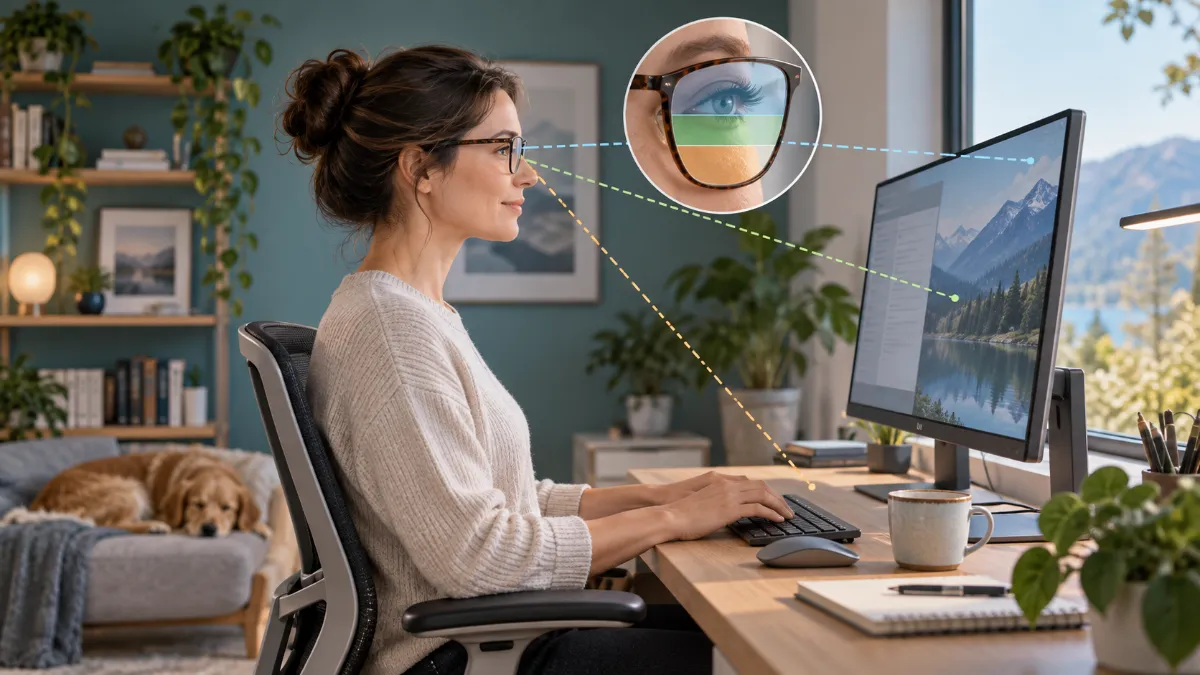
Progressive lenses provide different powers across the lens. The part used for a screen at intermediate distance may be narrower than expected or poorly aligned with the screen in your current posture. Moving your head can temporarily bring text into focus while creating an uncomfortable working position. This does not prove that the glasses alone caused your pain.
A field study of presbyopic computer users found that changing monitor position affected head posture and musculoskeletal symptoms. With general-purpose progressives, achieving a comfortable posture did not automatically make the entire screen clear. The findings support individual adjustment, not a universal monitor height. Read the monitor-position study.
Understand the viewing path
| Situation | Viewing path | What to check |
|---|---|---|
| Screen too high for the usable lens zone | Eyes → chin lifts ↑ → screen | Try a lower screen position while keeping the neck relaxed. |
| Screen positioned for the task | Eyes → suitable lens zone → readable text | Check the whole working area, not just its centre. |
| Text clear only through a narrow area | Head repeatedly turns or tilts → text | Discuss lens design, prescription and frame fit. |
The table represents a viewing relationship; it does not map the optical design of every progressive lens. Bring your actual screen measurements to your appointment.
Adjust in a sensible order
- Start with your seat and support. Sit in a position you can vary comfortably. Avoid building the setup around a posture you can hold only briefly.
- Bring the main task in front of you. Repeatedly twisting towards a secondary screen can add a separate problem.
- Increase text size before leaning in. Check that the content you use most is readable.
- Try lowering the monitor gradually. Stop at a position that allows useful vision without forcing the chin up or down. Do not follow a fixed height regardless of comfort.
- Check distance and frame position. If you keep sliding your glasses or moving the screen excessively, seek a fitting and prescription review.
Would computer glasses be better?
Computer-specific lenses may provide a viewing range suited to desk tasks. They are not interchangeable with every everyday prescription, and some are unsuitable for driving or general distance use. A study comparing computer-specific and general-purpose progressive lenses reported differences in comfort and posture; selection still depends on the individual and the task. Read the lens-comparison study.
Ask what distance the proposed lenses cover, whether a second pair would be necessary, and how you should use them safely when leaving the workstation. Blue-light filtering is a different lens feature from correcting the focus needed for your working distance.
Bring this checklist to your appointment
When to get further help
Arrange an eye examination for persistent blur or difficulty adapting to glasses. Neck pain that persists, follows injury or includes arm weakness or numbness warrants medical assessment rather than repeated workstation experiments. New double vision or sudden visual loss needs urgent care.
Quick answers
Should every progressive-lens wearer lower their monitor?
No. It is a possible adjustment, not a universal prescription. Lens design, frame fit, body position and the task determine what works.
Will an expensive chair solve it?
A chair cannot correct an unsuitable optical viewing path. Use our ergonomic-chair guide for support and fit considerations, and our guide to screen-related headaches if headaches accompany the problem.
This article provides general educational information and does not replace an individual examination. No product has been personally tested for this article. About Meerawell