

Key takeaways
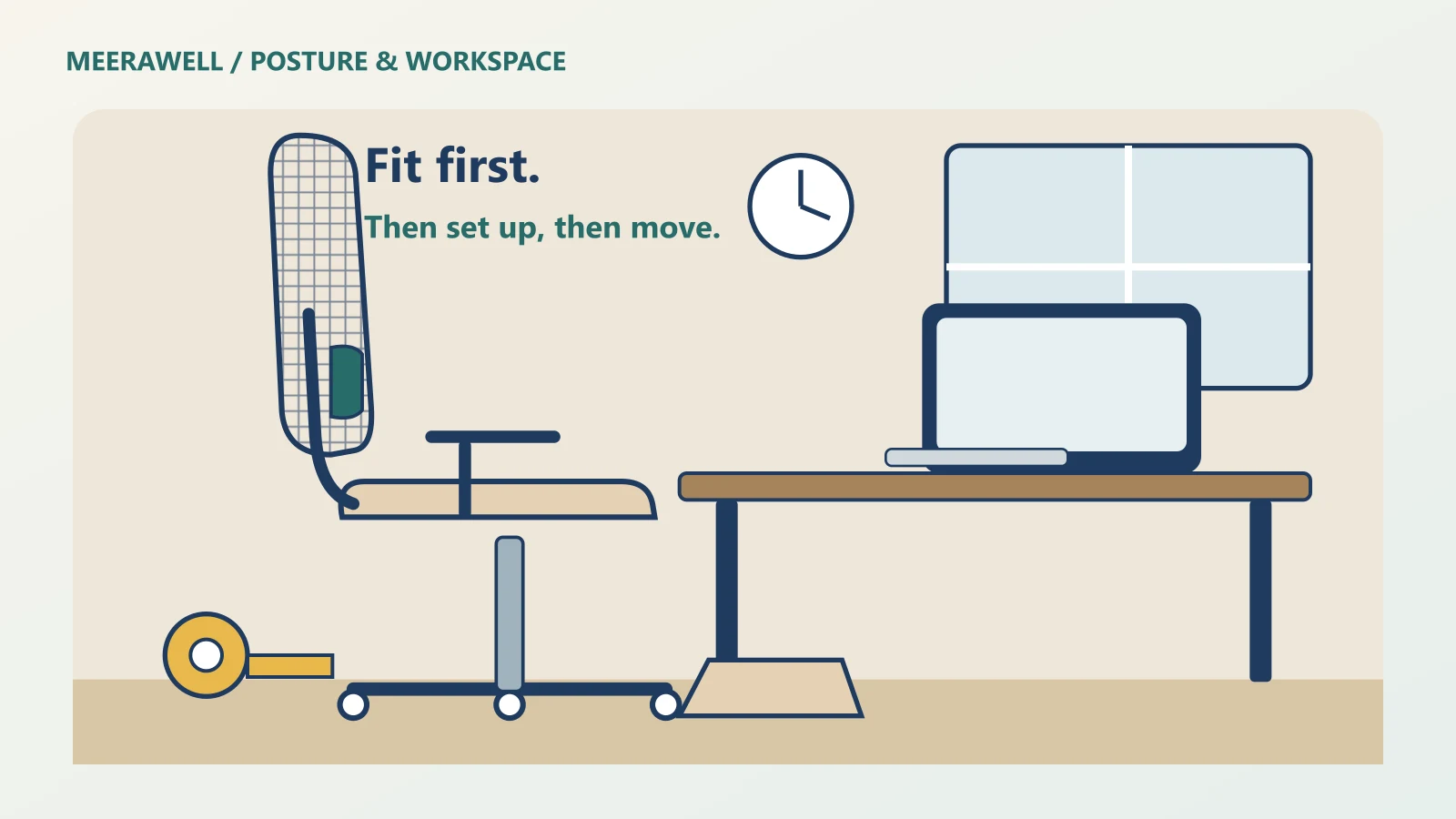
- The best chair for long hours of sitting is the one that fits your body and your desk. Fit beats brand, price and the word “orthopaedic”.
- Measure two numbers before you shop: the height of the crease behind your knee and your thigh length. Then check five adjustments.
- No chair cancels out eight still hours. Short, frequent breaks and a well-placed screen matter as much as the chair.
The short answer: choose a chair for long hours of sitting by fit, not by label. Its lowest seat height should let your feet rest flat. The seat should leave a gap behind your knees. You need movable lumbar support, a recline that locks, and armrests that let your shoulders drop. Then set up your screen, and get up often.
This guide pulls together everything Meerawell has published on choosing a chair for long hours of sitting and setting up your desk, so you can start here and go deeper where you need to.
Jump to:
- Why long sitting days hurt
- Measure yourself first
- The five adjustments that matter
- Mesh or foam in Indian heat
- What each budget buys
- Comparing brands fairly
- Screen, keyboard and laptop
- Breaks and standing
- What the evidence says
- Short, tall and heavier sitters
- Your setup plan
1. Why Long Sitting Days Feel Worse by Evening
At breakfast, almost any chair feels fine. By evening, you shift, slump and perch on the front edge. That slow slide is the real test of a chair for long hours of sitting.
Three things go wrong in a poorly fitted chair. If the seat is too high, your feet dangle and the front edge presses into your thighs. If the seat is too deep, you slide forward and lose the backrest. If the armrests are too high, your shoulders creep up towards your ears.
Each problem pushes you into a posture you hold for hours. Muscles that hold a fixed position tire. The discomfort that follows is usually a fit and movement problem, not a disease.
Posture inside the chair matters too. A classic German study placed a pressure sensor inside one volunteer’s spinal disc. Slumping forward raised disc pressure far more than relaxed sitting. It was one healthy man, so it cannot predict your pain. But it shows why a chair that supports you leaning back, rather than hunching forward, is worth having. Our guide to ergonomic chairs under ₹10,000 explains that study in more detail.
2. Measure Yourself Before You Shop
Most chair listings give dimensions. Most buyers never compare them with their own body. Two measurements take five minutes and save a bad purchase.
Popliteal height. Sit on a firm chair with your feet flat and knees at roughly a right angle. Ask someone to measure from the floor to the crease behind your knee, in the footwear you wear at your desk. The chair’s lowest seat height should be at or a little below this number.
An ergonomics teaching resource from IIT Guwahati puts the 25th-percentile popliteal height for Indian adults at about 40 cm. Some popular chairs start higher: one listing Meerawell checked gave 48–58 cm. If yours is 41 cm and the chair’s lowest setting is 48 cm, you will need a footrest.
Thigh length. Sit fully back and measure from the backrest to the back of your knee. The seat depth should be a few centimetres shorter, so the front edge does not press behind your knees.
Write both numbers down and take them to every showroom and listing. This is the single most useful habit when choosing a chair for long hours of sitting. It also stops you being swayed by discount badges.
3. The Five Adjustments in a Chair for Long Hours of Sitting
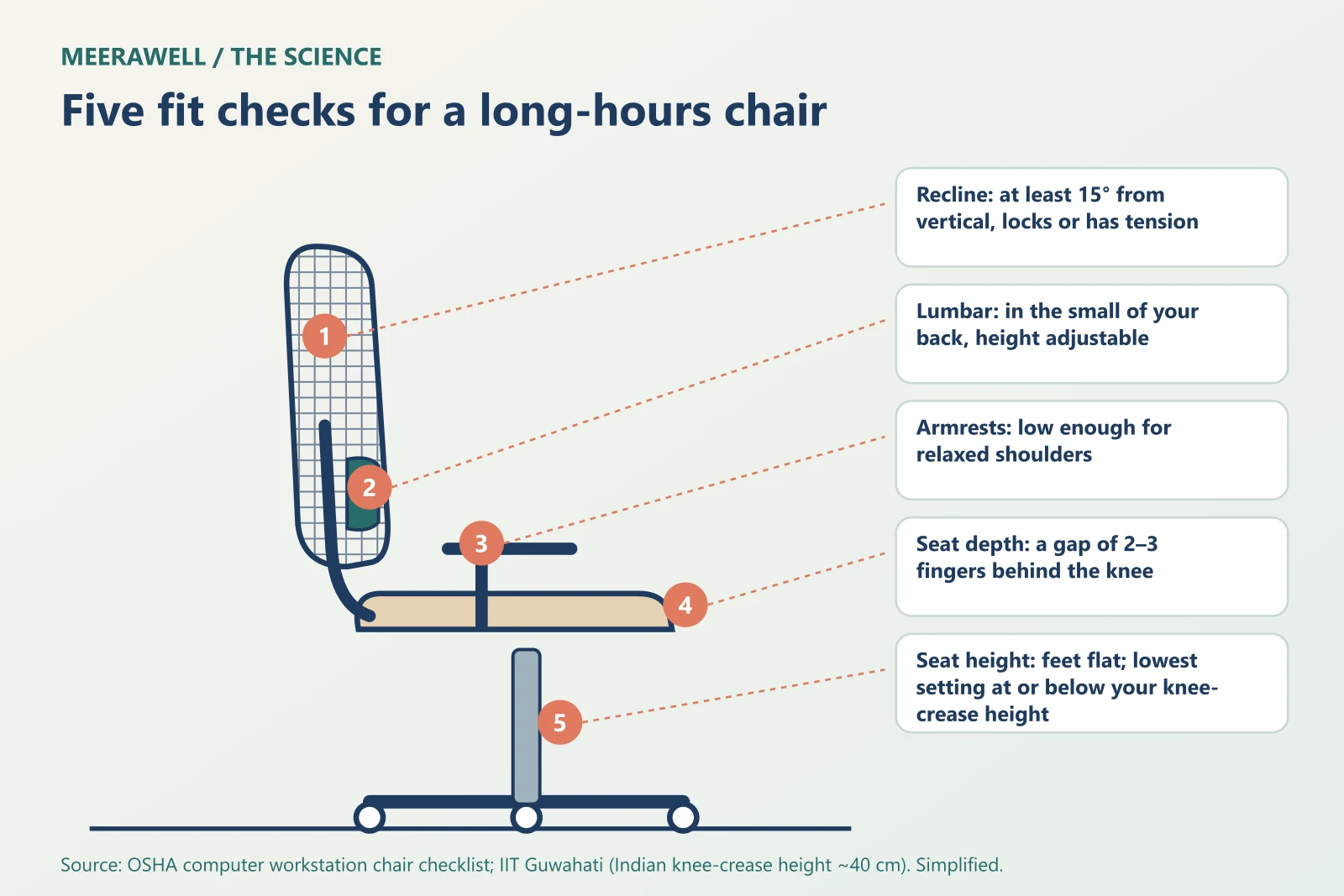
The US Occupational Safety and Health Administration’s chair checklist is a useful neutral standard. Translated into a shopping list for a chair for long hours of sitting, it looks like this:
| Adjustment | What good looks like | Quick test |
|---|---|---|
| Seat height | Feet flat on the floor or a footrest | Lowest setting at or below your popliteal height |
| Seat depth | A small gap behind the knee | Two or three fingers fit between seat edge and knee |
| Lumbar support | Sits in the small of your back, height adjustable | Slide it until it meets your lower-back curve |
| Recline | Leans back at least 15 degrees and locks, or has tension | Lean back; it should support, not drop |
| Armrests | Low enough for relaxed shoulders, elbows near your body | Shoulders stay down while you type |
OSHA also recommends a five-leg base with castors for stability. A headrest is optional; it helps most when you recline.
If a chair for long hours of sitting misses one of these, decide whether you can live without it. A seat that is too high can be fixed with a footrest. A seat that is too deep cannot be fixed easily. Seat-depth sliders are often the first feature to disappear at lower prices.
Do not pay extra for words. “Orthopaedic” is a marketing term, not a medical certification. A durability standard such as BIFMA tells you the chair is sturdy, not that it fits you.
4. Mesh or Foam in Indian Heat
In a humid Mumbai monsoon or a Delhi June without AC, seat material matters. Our mesh vs foam chair guide looked at what studies actually measured.
The short version: mesh lets heat and moisture escape, so it usually feels cooler. A well-made foam seat can feel more supportive late in a long session. In one three-hour comparison, people reported similar comfort and pain on both, and pain rose on both in the final hour. So material alone does not make a good chair for long hours of sitting.
For most Indian rooms, a mesh back with a foam seat is a sensible default. Avoid cheap PU leatherette, which can crack and peel in heat and humidity.
The mesh itself needs checking. Sit on the exact model if you can, feel for a hard frame edge under your thighs, and read the warranty for the seat as well as the gas lift.
5. What Each Budget Buys
You do not need to spend the most to get a chair for long hours of sitting with the core adjustments. You do need to know what you are giving up at each level.
| Budget | What you usually get | What you usually give up |
|---|---|---|
| Under ₹10,000 | Gas-lift height, lockable tilt, movable lumbar, 2D armrests | Seat-depth slider, 4D armrests, low seat heights |
| Just above ₹10,000 | Seat-depth sliders start to appear in some ranges | Check whether you get 4D armrests |
| Higher prices | Often more adjustment range | Still check fit, warranty and return terms |
These are patterns, not rules. Our ergonomic chair under ₹10,000 guide found that in one major Indian brand’s 2026 line-up, the first models with a seat slider started just above ₹10,000. It also explains how to read discount badges and missing specifications.
A higher price buys more adjustment range and durability. It does not guarantee fit. A ₹9,000 chair that fits you can serve you better than a ₹30,000 chair that does not.
When buying online, check the return window before you order. Sit in the chair for a full working day in the first week, and send it back if it fails your measurements.
6. How to Compare Brands Fairly
Search results push brand battles: The Sleep Company against Green Soul, Featherlite against both. Our Sleep Company vs Green Soul review compared published seat designs and adjustment features, not measured performance.
Its conclusion applies to every brand comparison. Specifications differ by exact model and version, not just by brand. A grid seat and a foam seat are different constructions. But without pressure or temperature measurements on the same people, no article can name a physiological winner.
So when you shortlist a chair for long hours of sitting, compare models, not brands. Write down the exact model name, then check:
- the published seat height range against your popliteal height;
- whether there is a seat-depth slider, and its range;
- the type of lumbar support and whether it moves;
- the warranty on the mechanism, gas lift and seat.
Our wider best ergonomic chair in India guide walks through popular Indian ranges using the same fit-first approach. None of these guides is sponsored, and none claims hands-on testing.
7. Set Up the Screen, Keyboard and Laptop
A perfect chair for long hours of sitting cannot rescue a badly placed screen. OSHA’s monitor guidance suggests a viewing distance of about 50–100 cm, with the top line of the screen at or slightly below eye level.
Set things up in this order: chair first, then desk height, then screen. With your feet flat and back supported, your elbows should be close to your sides and roughly level with the keyboard.
Laptops join the screen and keyboard, so one of them is always in the wrong place. Raising the laptop helps your neck but lifts your hands. For long sessions, use a stand plus a separate keyboard and mouse. Our laptop stand guide explains the trade-offs.
Progressive glasses change the rules. If you tilt your head back to read through the lower part of the lens, lower the screen instead. OSHA makes the same point for bifocal wearers. Our guide to progressive glasses and neck pain covers this in detail.
Lighting and brightness affect posture as well. If you lean in to read, the screen may be too dim or the text too small. See our guide to monitor brightness for eye comfort.
8. Move More: Breaks, Standing and Exercise Snacks
The best chair for long hours of sitting is still a chair. The World Health Organization’s 2020 guidelines recommend reducing sedentary time for all adults and replacing it with activity of any intensity. The evidence was not strong enough to set a safe number of sitting hours.
What actually reduces sitting at work? A Cochrane review pooled 34 workplace studies with 3,397 people.
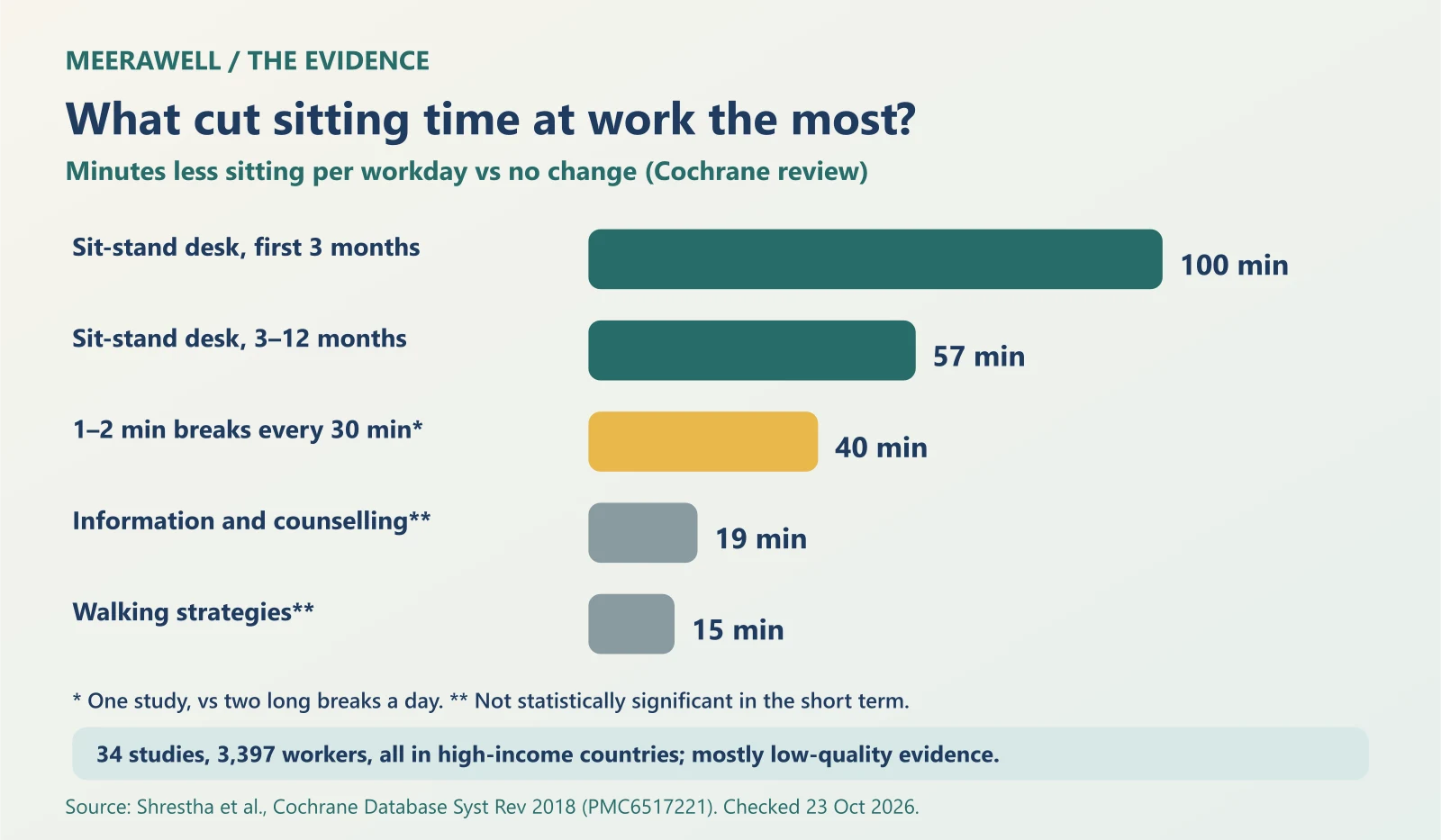
Sit-stand desks cut sitting most, by about 100 minutes a day in the first three months. In one study, short breaks of one to two minutes every half hour reduced sitting by about 40 minutes compared with two long breaks. Most of the evidence was rated low quality, and all studies were from high-income countries.
You do not need equipment to start. Stand for phone calls. Refill your water bottle on another floor. Our guide to exercise snacks for a busy workday shows how short bouts fit into an office day. If you are thinking about walking while you work, read our walking pad vs treadmill guide first.
Did you know? The Cochrane reviewers looked for trials of standing or walking meetings and found none. One of the easiest office habits to try is also one of the least studied.
9. What a Good Chair Can and Cannot Do
Can a good chair for long hours of sitting reduce discomfort? There is some evidence. In a workplace study in the United States, office workers received either a highly adjustable chair plus ergonomics training, training alone, or nothing until the end.
After 12 months, the group with the adjustable chair and training had less build-up of aches across the working day. Training alone did not reduce that build-up. It was a field study in one organisation, and it measured reported aches, not diagnosed back conditions. It suggests the chair and the know-how to adjust it work together.
What a chair cannot do is just as important:
- It cannot treat a slipped disc, sciatica or arthritis.
- It cannot replace movement and breaks.
- It cannot fix a screen that forces you to crane your neck.
So think of a chair for long hours of sitting as support, not treatment. If pain persists after you have fixed the fit and started moving more, the problem may not be the chair.
10. Special Cases: Short, Tall and Heavier Sitters
Average-sized chairs are built around average-sized bodies. If you sit outside that middle, the checks in this guide matter even more.
If you are short, the lowest seat height is the number to watch. If your knee-crease height is under 40 cm, many chairs will leave your feet dangling. A firm footrest is a cheap, effective fix. Look for a shorter seat depth or a slider, and armrests that go low enough for your shoulders to relax.
If you are tall, check the highest seat setting and the seat depth. A slider that extends the seat helps support longer thighs. A taller backrest, or a headrest, matters more when you recline.
If you are heavier, read the stated weight capacity and check the base and gas lift. A seat that is too narrow will push against the armrests. Ask the seller for the weight rating in writing if it is not listed.
If several people share one chair, for example at home during work-from-home days, adjustability matters more than any single feature. Each person should be able to reset seat height, lumbar position and armrests in under a minute.
If you already have back pain, tailbone pain or numbness, try a chair for long hours of sitting before you buy it, and see a doctor about the pain itself. A chair can make sitting more comfortable. It cannot diagnose or treat the cause.
11. Your Long Hours Setup Plan
Here is how to choose and set up a chair for long hours of sitting, as one plan. Do it once, then check it again whenever you change desks, glasses or chairs.
- Measure: your popliteal height and thigh length, in your desk footwear.
- Shortlist: chairs whose lowest seat height and seat depth match your numbers.
- Check the five adjustments: height, depth, lumbar, recline and armrests.
- Pick the material for your room: mesh back, foam or mesh seat, no cheap leatherette.
- Set up the desk: chair first, then keyboard height, then screen distance and height.
- Move: stand or walk for a minute or two every half hour, and build longer activity into your week.
- Review after a week: if the evening slump persists, adjust one thing at a time.
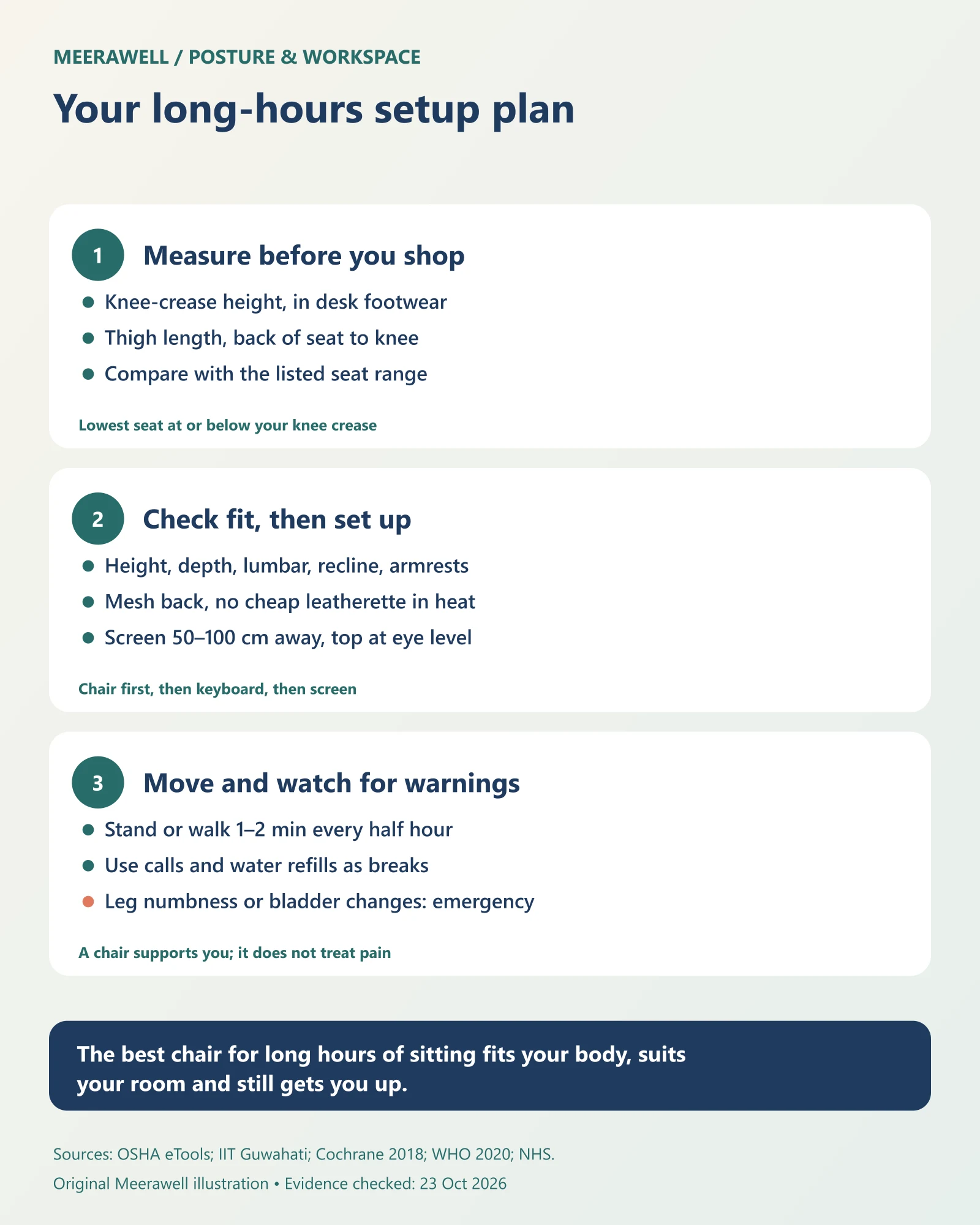
The Verdict: the best chair for long hours of sitting is the one that matches your measurements, in a material that suits your room, set up with your screen and used with regular breaks. Spend on fit and adjustment range first, and on brand last.
When back or neck pain needs a doctor
The NHS says to call emergency services for back pain with numbness, tingling or weakness in both legs, loss of feeling around the genitals or bottom, or new bladder or bowel problems. Get urgent advice for severe pain that starts suddenly or comes with fever. See a doctor if pain lasts beyond a few weeks despite changes.
Frequently asked questions
What is the best chair for long hours of sitting in India?
The chair for long hours of sitting that fits you. Its lowest seat height should match your knee-crease height, the seat should leave a gap behind your knees, and it should have movable lumbar support, a lockable recline and adjustable armrests.
Is mesh better in a chair for long hours of sitting?
Mesh usually feels cooler in Indian heat, while a good foam seat can feel more supportive. In one three-hour study, comfort was similar on both. A mesh back with a foam seat is a sensible default.
How often should I get up from my chair?
There is no proven perfect interval. In one workplace study, one- to two-minute breaks every half hour reduced daily sitting more than two long breaks. Aim for short, frequent breaks you can actually keep up.
Next step
Take your two measurements to a real listing and see what this budget can and cannot buy.
Sources and evidence
Evidence checked on 23 October 2026. No chair was tested for this guide, and no brand paid for inclusion. General education, not a diagnosis.
- OSHA eTool: computer workstation chairs
- OSHA eTool: computer monitors
- IIT Guwahati Virtual Lab: seat height and popliteal height
- Shrestha et al., 2018: workplace interventions for reducing sitting at work (Cochrane Review)
- Bull et al., 2020: WHO guidelines on physical activity and sedentary behaviour (Br J Sports Med)
- Amick et al., 2003: office ergonomics intervention and musculoskeletal symptoms (Spine)
- Wilke et al., 1999: in vivo intradiscal pressure measurements (Spine)
- NHS: back pain