Key takeaways
- In the AMOLED vs LCD eye strain question, panel type matters less than how the screen dims, how bright it is compared with the room, and how long you look without breaks.
- Many AMOLED phones dim by switching pixels on and off rapidly (PWM). Most people never notice; some sensitive people report headaches at low brightness.
- There is no scientific evidence that blue light from screens damages the eyes, and dark mode is not automatically easier to read.
Your Phone Screen Is Flickering Hundreds of Times a Second
Turn an OLED phone’s brightness right down in bed, and on many models the pixels stop glowing steadily. They switch on and off hundreds of times a second. DXOMARK, a display-testing company, notes that at minimum brightness a pixel may be lit for only around 10% of each cycle. Your brain blends the pulses into a steady, dim image.
The trick is called pulse-width modulation (PWM). It is why a friend may tell you that your new AMOLED phone is causing your evening headaches, and that you should go back to LCD.
Is that true?
The short answer: for most people, neither panel is reliably easier on the eyes. Eye strain usually comes from long, unbroken viewing, less blinking and a screen much brighter or dimmer than the room. A minority are sensitive to PWM flicker at low brightness. For them, the fix is often a setting, a brightness habit or a phone with higher-frequency dimming.
1. The Science: Why AMOLED Flickers
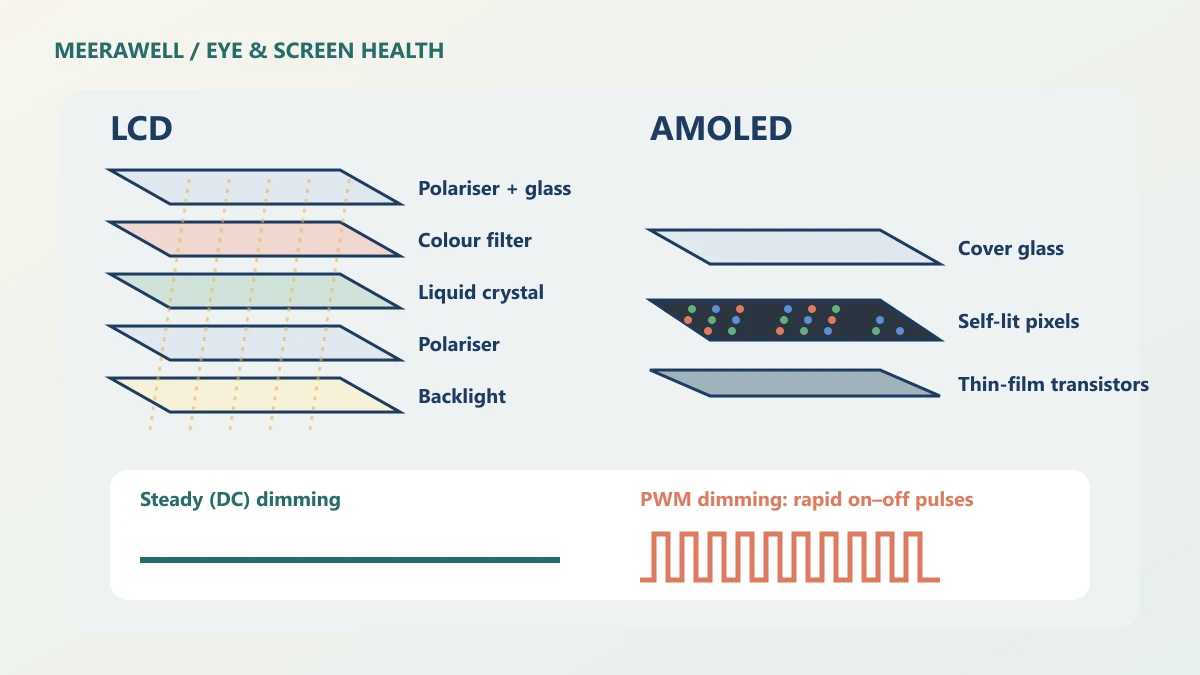
An LCD makes no light of its own. A backlight shines through liquid crystals that twist to let more or less light through. To dim the screen, the backlight is dimmed.
An AMOLED has no backlight. Each pixel emits its own light, and a black pixel is simply off, which is why the blacks look so deep. But DXOMARK explains that OLED diodes cannot easily be dimmed by lowering the current without changing colour. So many phones dim by pulsing them instead, and the dimmer the screen, the longer the dark gaps.
LCDs are not automatically flicker-free either. Some dim their backlight with PWM too, though often at higher frequencies.
2. Who Notices PWM Flicker?
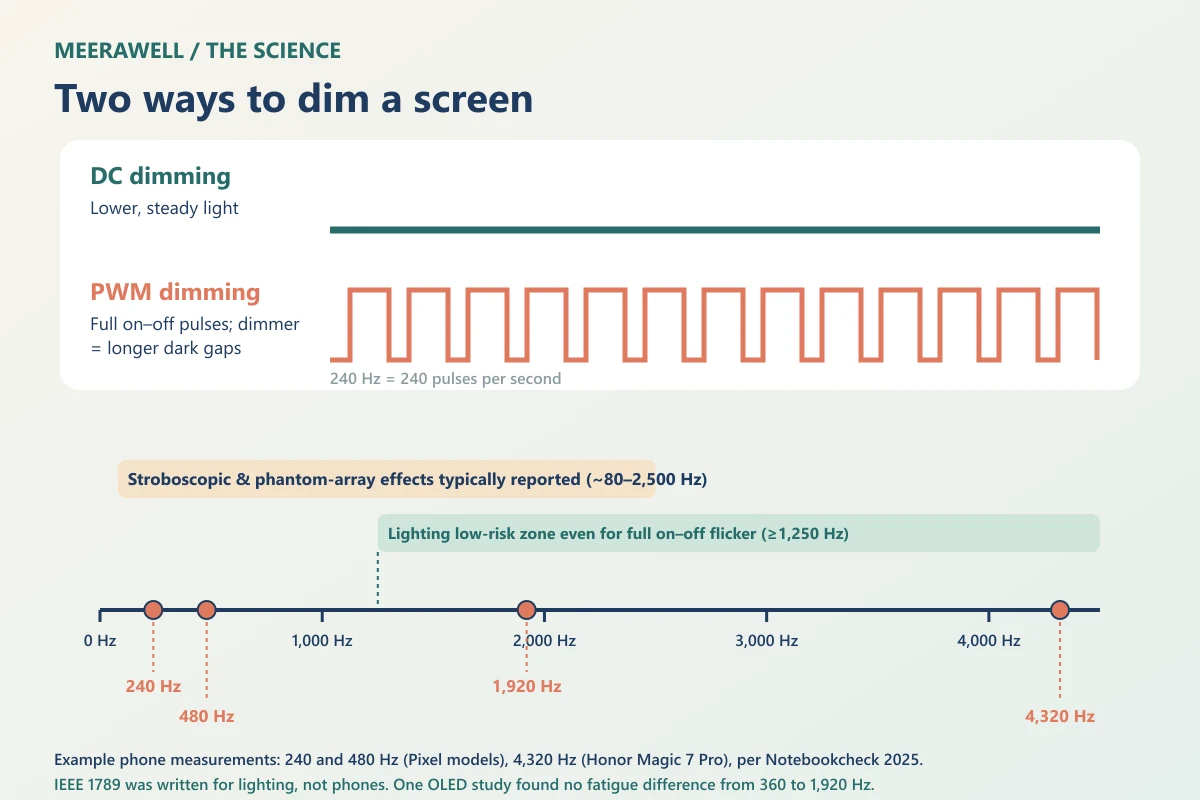
Above a certain speed, flicker blends into steady light, so most people never see PWM directly. But DXOMARK’s guide to light modulation describes subtler effects:
- Visible flicker, mainly below about 90 Hz.
- The stroboscopic effect, where moving objects seem to jump, generally between 80 and 2,000 Hz.
- The phantom array effect, a trail of repeated images during quick eye movements, reported from about 80 to 2,500 Hz and sometimes higher.
Phones vary widely. In an August 2025 report, Notebookcheck measured the Pixel 9 and 9 Pro at 240 Hz, found a setting on some Pixel 10 Pro models that doubles this to 480 Hz, and noted that the Honor Magic 7 Pro reaches 4,320 Hz.
Did you know? LCDs began with a puzzle. In 1888, the Austrian chemist Friedrich Reinitzer described a cholesterol compound that seemed to melt twice: into a cloudy liquid at about 145.5 °C, then into a clear one at about 178.5 °C. That cloudy in-between state was later called a liquid crystal.
3. AMOLED vs LCD Eye Strain: What the Evidence Says
Less than the internet suggests.
A direct test on phones. Researchers presented a study of PWM dimming frequency and visual fatigue on OLED smartphones comparing 360 Hz to 1,920 Hz and non-flickering DC dimming. After about 35 minutes of viewing in the dark, they found no significant difference in visual fatigue. Reassuring, but short, and it cannot rule out effects in especially sensitive people.
Guidance from lighting. The IEEE 1789 recommended practice for LED lighting, explained by its working-group chairs, treats full on–off flicker as low risk only at 1,250 Hz or above.
| PWM frequency | Full on–off flicker, judged by the lighting low-risk limit |
|---|---|
| 240 Hz | Above the limit |
| 480 Hz | Above the limit |
| 1,250 Hz and above | Within the limit |
IEEE 1789 was written for room lighting, not small handheld screens. Treat this as a reason higher frequencies are considered gentler, not a safety certificate.
4. Brightness, Blue Light and Dark Mode
- Brightness: the American Academy of Ophthalmology advises matching screen brightness to the room. It also notes that people blink only about 5 to 7 times a minute on screens, compared with about 15 normally.
- Blue light: the AAO states there is no scientific evidence that blue light from devices damages the eye. Night settings may help sleep timing, not eye health.
- Dark mode: a 2013 study in Ergonomics found dark text on a light background gave better acuity and proofreading in younger and older adults. If white-on-black text looks fuzzy, see our guide to why dark mode text can look blurry.
5. Practical Steps If Your Screen Bothers Your Eyes
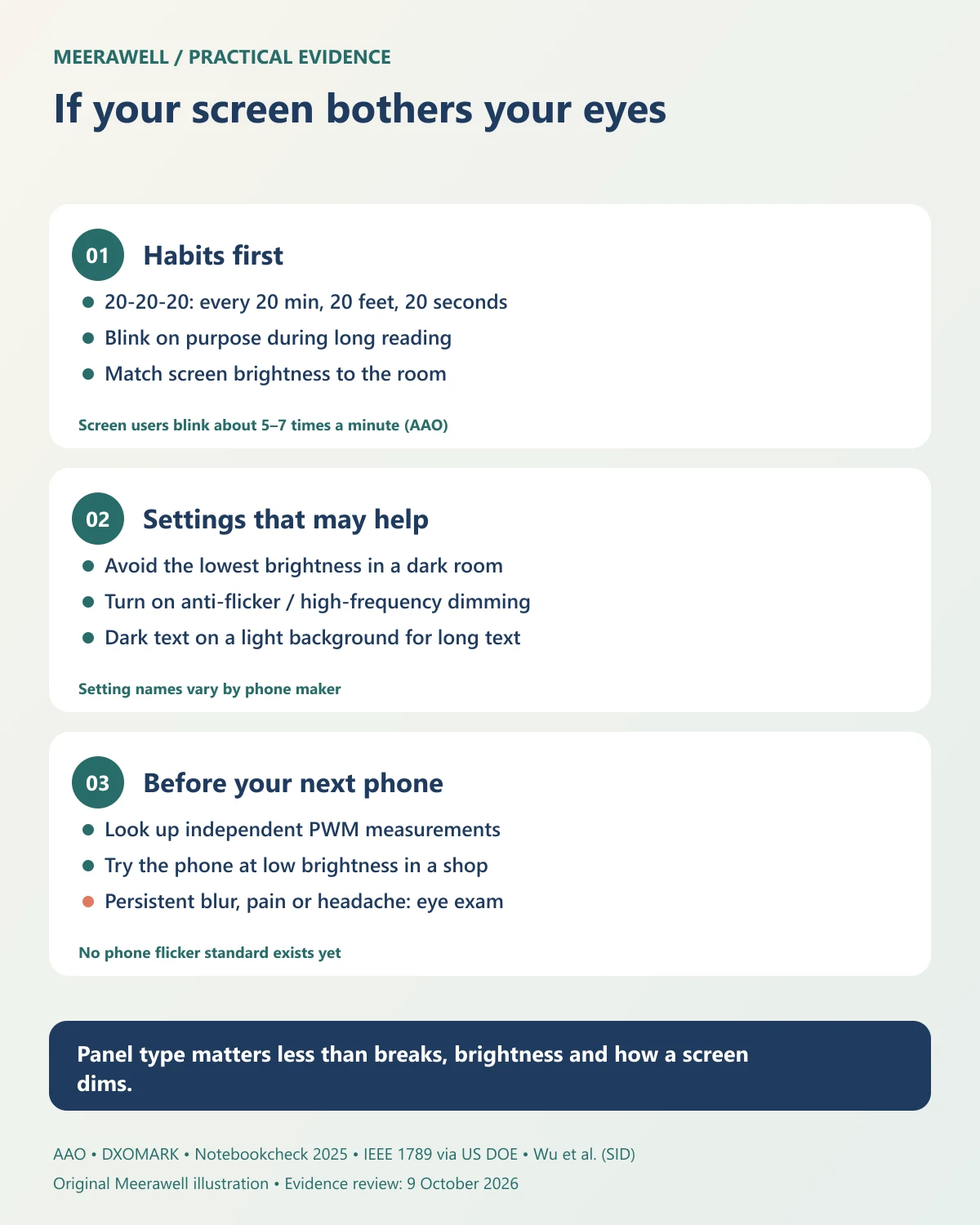
- Take breaks and blink. Every 20 minutes, look at something 20 feet away for 20 seconds.
- Avoid the lowest brightness in a dark room. Turn on a small lamp and raise the screen brightness a little.
- Look for an anti-flicker setting. Names vary: “eye comfort”, “high-frequency PWM”, “DC dimming” or “Adjust brightness for sensitive eyes”.
- Check measurements before buying if you know you are flicker-sensitive. Many spec sheets do not list PWM frequency.
- Get your eyes checked if strain persists. See our guide to computer vision syndrome.
The Verdict: on AMOLED vs LCD eye strain, most people can use either panel comfortably. If an OLED phone bothers you, suspect low-frequency PWM at low brightness, change the settings, and check flicker measurements before your next purchase.
When it is not just the screen
Arrange an eye examination for:
- blurred or double vision that persists after a break
- headaches that are new, severe or getting worse
- eye pain, redness or sensitivity to light
- flashes, new floaters or a shadow in your vision
Seek urgent care for sudden loss of vision, or a sudden severe headache with weakness, confusion or difficulty speaking.
Frequently asked questions
Is AMOLED worse for your eyes than LCD?
Not for most people. Many AMOLED screens dim using PWM flicker, which some sensitive people find uncomfortable at low brightness. For everyone else, brightness, breaks and blinking matter more than panel type.
What PWM frequency is good for the eyes?
There is no medically agreed threshold for phones. Lighting guidance treats full on–off flicker at 1,250 Hz or higher as low risk. One phone study found no fatigue difference between 360 Hz and 1,920 Hz over about 35 minutes.
Does dark mode reduce eye strain?
Not reliably. It can feel comfortable in a dark room and saves battery on OLED, but studies found dark text on a light background easier to read. Choose what looks clearest to you.
Next step
Before blaming the panel, check the basics: breaks, blinking, brightness and an up-to-date eye test.
Sources and evidence
Evidence checked on 9 October 2026. Device measurements come from independent reviewers and may differ by model, region and software version. No device was tested for this article.
- DXOMARK: flicker, the display affliction (why OLEDs use PWM)
- DXOMARK: temporal light modulation and visual comfort
- Notebookcheck, August 2025: Pixel display PWM measurements
- Wu et al.: effect of PWM dimming frequency of OLED smartphones on visual fatigue (SID Symposium Digest)
- Miller and Lehman, US DOE 2015: understanding the IEEE 1789 recommended practice on flicker
- American Academy of Ophthalmology: computers, digital devices and eye strain
- American Academy of Ophthalmology: should you be worried about blue light?
- Piepenbrock et al., 2013: positive display polarity is advantageous for both younger and older adults (Ergonomics)
- Reinitzer, 1888: Beiträge zur Kenntniss des Cholesterins (Monatshefte für Chemie)